Inefficient time tracking is a silent drain on business resources. In the US alone, businesses lose an estimated $7.4 billion per day, or $1.9 trillion annually, to lost productivity from untracked hours.
For any business, but especially for those managing remote or hybrid teams, accurately tracking employee time is essential for payroll, project billing, and overall productivity. This is where the best employee time tracking software of 2025 comes in.
This guide is designed by professionals to help you navigate the crowded market of time tracking tools. Whether you run a small business, a distributed remote team, or a large enterprise, the right software can transform your operations. It provides clarity on project costs, ensures payroll is accurate, and offers insights to boost efficiency.
In this post, we'll review the top solutions available, compare their features, and provide a clear roadmap for choosing the tool that best fits your company's needs.
What is Employee Time Tracking Software?
Employee time tracking software is a digital tool that records the hours employees spend on work-related tasks and projects. It's more than just a digital timesheet; it’s an all-in-one workforce management tool with features like payroll integration, productivity insights, and compliance reporting.
These tools, often called employee time clock apps, help automate the entire process from clock-in to payroll. Modern solutions come in various forms to suit different work environments:
Manual trackers: Employees start and stop a timer as they work on tasks.
Automatic trackers: The software runs in the background, logging activity on work-related apps and websites.
GPS-enabled trackers: Ideal for field service and construction teams, these apps track location during work hours.
AI-powered trackers: These advanced systems offer productivity analytics, identify burnout risks, and automate timesheet creation.
Why Time Tracking Matters in 2025
The shift toward remote and hybrid work models has made effective time tracking more critical than ever. It provides the structure and accountability needed to manage a distributed workforce effectively. In 2025, the benefits extend far beyond simply logging hours.
Accurate time tracking is crucial for:
Payroll Accuracy: Automated timesheets eliminate manual errors, preventing overpayments and underpayments that erode trust and your bottom line.
Labor Compliance: With complex labor laws like the Fair Labor Standards Act (FLSA) in the US, automated tracking provides an indisputable audit trail for overtime, breaks, and total hours worked, ensuring workforce compliance.
Productivity Analytics: Understanding how time is spent allows managers to identify bottlenecks, optimize workflows, and allocate resources more effectively. Studies show the average US company loses significant productivity due to untracked hours.
Accurate Invoicing: For agencies, freelancers, and consultancies, precise time tracking is the foundation for transparent and accurate client billing, preventing revenue leakage and improving client relationships.
Preventing Time Theft: Even unintentional time theft, like long breaks or rounding up hours, can add up. Time tracking software ensures that you only pay for hours worked.
How to Choose the Right Time Tracking Software
With so many options, selecting the right tool can feel overwhelming. Focus on these key criteria to find a solution that aligns with your business needs. When choosing the best employee time tracking app, prioritize integrations with your payroll software, mobile compatibility for remote workers, and automated compliance reports to avoid costly errors.
Scalability: Can the software grow with you? A tool that works for a 5-person startup should also be able to scale for a 100-person enterprise.
Pricing and Free Plans: Evaluate the cost against the features. Many tools offer excellent free plans that are perfect for small teams or freelancers, while paid plans unlock advanced features like invoicing and detailed analytics.
Integrations: The software must fit into your existing tech stack. Look for integrations with key tools like QuickBooks for accounting, Gusto for payroll, and Asana or Trello for project management.
Compliance Features: Ensure the tool includes features for tracking overtime, managing break policies, and generating audit trails to comply with local and federal labor laws.
Ease of Use and Mobile Apps: A complicated tool won't get used. Prioritize software with an intuitive interface and reliable mobile apps for employees who work on the go or in the field.
Comparison Table: Best Employee Time Tracking Software
Here's a quick comparison of the top time tracking tools in 2025 based on their best use case, key integrations, and user ratings.
Top 13 Employee Time Tracking Tools (2025 Reviews)
Here are our detailed reviews of the best employee time tracking software for 2025.
1. BugTrackin – Best for Freelancers and Teams Who Want Transparent Tracking
Official Website: https://bugtrackin.com

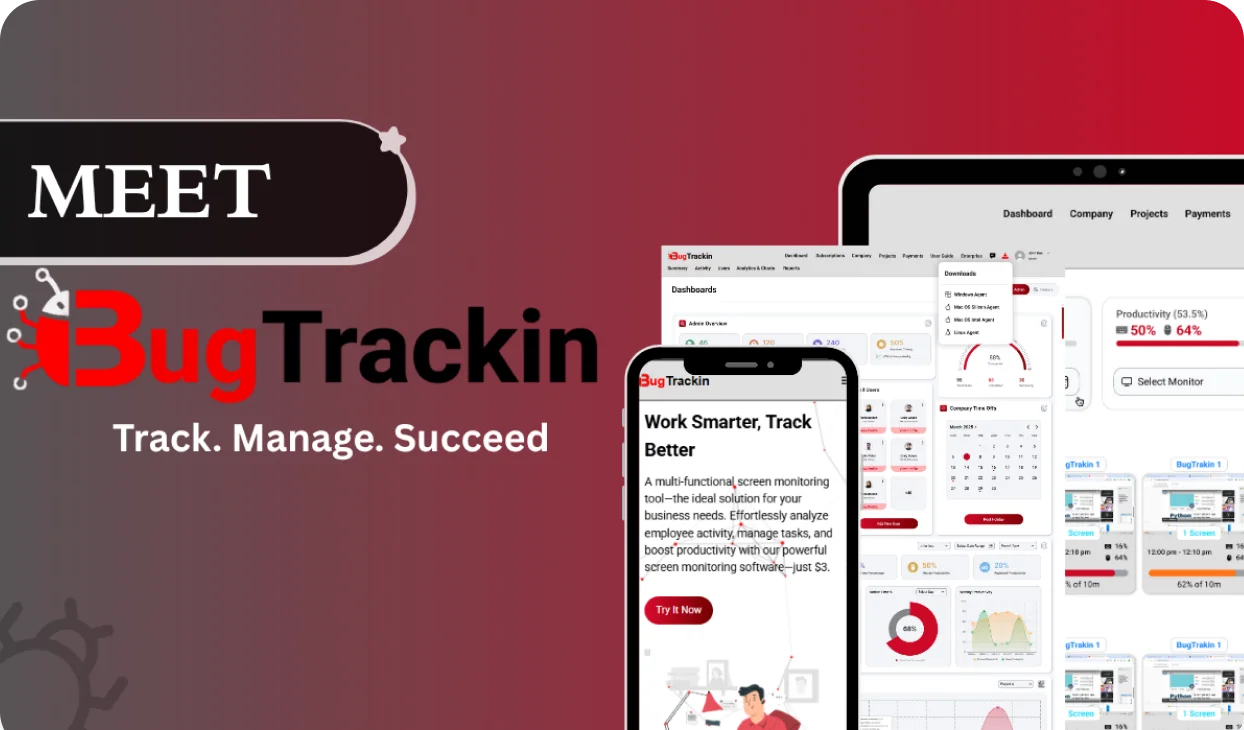
BugTrackin is designed to make time tracking and task management effortless for freelancers and teams. It not only allows you to log hours and manage tasks but also brings an edge with its integrations for communication and scheduling, making collaboration smooth and transparent.
Key Features
Task tracking
project management
Detailed reports
Chat and scheduling integrations.
Pros
Great for freelancers and small teams
Enhances client transparency
Easy to share reports.
Cons
Still growing, so fewer third-party integrations compared to bigger players as it’s an all-in-one employee monitring and management software.
Integrations
Slack
Microsoft Teams
Google Calendar
Outlook
Review
"Been using BugTrackin for a few weeks now, and honestly, it's a lifesaver for team productivity. I can see what everyone’s working on in real time, track hours, and get insights without micromanaging. It’s simple, non-intrusive, and keeps the workflow smooth. If you manage a remote team, this tool is a must-have!"
2. Clockify – Best Free Employee Time Tracking App
Official Website: https://clockify.me

Clockify offers an impressively robust free plan that serves unlimited users and projects, making it ideal for startups and large teams on a budget. Its interface is straightforward, allowing users to track time via a timer or enter it manually in a timesheet.
Key Features
Unlimited tracking
Projects and users
Reporting
Team management
Pros
Generous free plan
Easy to use
Available on all devices
Cons
Advanced features like invoicing and targets are behind a paywall
Integrations
Trello
Asana
Jira,
Google Calendar, and 100+ more.
Review
"The best part about Clockify is its simplicity and the fact that its core features are completely free. It's perfect for our growing team."
3. Hubstaff – Best Software for Remote Team Productivity
Official Website: https://hubstaff.com

Hubstaff is a powerful tool for managing remote teams, offering time tracking alongside productivity monitoring features like optional screenshots, activity levels, and app/URL tracking. It's a great choice for managers who need visibility into what their distributed team is working on.
Key Features
GPS tracking
Automated payroll
Productivity monitoring
Geofencing.
Pros
Excellent for managing remote workers
Detailed reporting.
Cons
Productivity monitoring can feel intrusive to some employees.
Integrations
QuickBooks
Gusto
Asana
PayPal.
Review
"Hubstaff has given us the visibility we need to manage our remote team effectively and ensure payroll is always accurate."
4. Harvest – Time Tracking Software
Official Website: https://www.getharvest.com

Harvest excels at simplifying time tracking, invoicing, and project budget management for small businesses. It's incredibly user-friendly and makes it easy to turn tracked hours into professional invoices. Its expense tracking capabilities are a welcome bonus.
Key Features
Time and expense tracking
Invoicing
Project budget alerts
Robust reporting
Pros
Intuitive interface
Seamless invoicing workflow
Great for client work
Cons
Can be pricey for larger teams, limited free plan
Integrations
QuickBooks
Asana
Trello
Stripe.
Review
"Harvest makes billing clients a breeze. We track our hours, and with a few clicks, a professional invoice is ready to send."
5. Toggl Track – Best App for Simple and Flexible Tracking
Official Website: https://toggl.com

Toggl Track is beloved for its simplicity and flexibility. With its one-click timer and browser extensions, it integrates seamlessly into any workflow without being disruptive. It's perfect for freelancers and teams who need a no-fuss time tracking solution.
Key Features
One-click time tracking
Reporting dashboard
Billable rates
Project tracking
Pros
Extremely easy to use
Beautiful interface
Generous free plan for up to 5 users.
Cons
Reporting on the free plan is limited.
Integrations
Google Calendar
Asana
Jira
Todoist.
Review Quote: "Toggl Track is so simple. I just hit start and stop. It doesn't get in my way and gives me the data I need to bill accurately."
6. Time Doctor – Best for In-Depth Productivity Analytics
Official Website: https://www.timedoctor.com

Time Doctor goes beyond simple time tracking to provide detailed analytics on how work gets done. It tracks time spent on each task, app, and website, providing managers with data to identify and eliminate distractions.
Key Features
Silent and interactive time tracking
Screenshot monitoring
Productivity reports
Payroll.
Pros
Granular data on employee productivity
Great for identifying inefficiencies
Cons
Monitoring features may not be suitable for all company cultures.
Integrations
Asana
Trello
Slack
Jira.
Review
"Time Doctor helped us understand exactly where our time was going, allowing us to refocus our efforts and improve productivity by 20%."
7. DeskTime – Best for Automated Time Tracking
Official Website: https://desktime.com/

DeskTime is a fully automatic time tracking app that runs in the background, categorizing applications and URLs as productive, unproductive, or neutral. It’s a "set it and forget it" solution for businesses that want data without manual timers.
Key Features
Automatic time tracking
Project tracking
Absence calendar
Productivity calculation
Pros
Fully automated
Provides clear productivity metrics
Cons
Less control for users compared to manual trackers
Integrations
Asana
Trello
Jira
Google Calendar
Review
"We love that DeskTime is automatic. It gives us accurate data on productivity without anyone having to remember to start a timer."
8. Insightful – Best for Security and Enterprise Teams
Official Website: https://www.insightful.io/

Insightful (formerly Workpuls) is designed for enterprises needing a blend of productivity management and security. It offers features like stealth mode, real-time monitoring, and automated time tracking to ensure compliance and protect sensitive data.
Key Features
Employee monitoring
Time tracking
Automatic time mapping
Productivity labeling
Pros
Strong security features
Highly scalable for large organizations
Cons
Primarily focused on monitoring, which may not fit all teams.
Integrations
Paycor
ADP
Jira.
Review
"Insightful gives our security and management teams peace of mind. We can track productivity while ensuring our data remains secure."
9. TimeCamp – Best for Tracking Project Profitability
Official Website: https://www.timecamp.com/

TimeCamp is a great tool for agencies and teams focused on project profitability. It tracks time against budgets, provides detailed reports on project health, and includes invoicing features, helping you understand which projects are most lucrative.
Key Features
Automatic time tracking
Invoicing
Attendance management
Productivity tracking
Pros
Strong focus on project profitability
Generous free plan for unlimited users
Cons
The interface can be slightly dated compared to competitors
Integrations
QuickBooks
Trello
Asana
Jira
Review
"TimeCamp helped us finally understand the profitability of our projects. Now we can make data-driven decisions about where to focus our efforts."
10. ActivTrak – Best for Workforce Analytics
Official Website: https://www.activtrak.com/

ActivTrak focuses on providing deep workforce analytics to improve operational efficiency. It offers productivity reports, workload management tools, and goal-setting features to help teams work smarter, not harder.
Key Features
Productivity reports
Team and individual dashboards
Workload management
App usage analytics
Pros
Excellent for data-driven management
Helps identify burnout risk
Cons
More of an analytics platform than a simple time tracker.
Integrations
Jira
Salesforce
Slack
Microsoft Teams.
Review
"ActivTrak's dashboards are a game-changer. We can see productivity trends at a glance and address issues before they become problems."
11. RescueTime – Best for Personal Focus and Productivity
Official Website: https://www.rescuetime.com/

RescueTime is geared towards individuals and teams looking to improve their focus and build better work habits. It runs in the background, automatically tracks time spent on apps and websites, and gives you a detailed picture of your digital life.
Key Features
Automatic time tracking
Focus sessions
Distraction blocking
Daily goals
Pros
Empowers individuals to manage their own time better
Excellent for improving focus
Cons
Less focused on team management and payroll
Integrations
Google Calendar
Slack.
Review
"RescueTime has fundamentally changed how I work. I'm more aware of my digital habits and can proactively block distractions."
12. QuickBooks Time – Best for QuickBooks Integration
Official Website: https://quickbooks.intuit.com

Formerly TSheets, QuickBooks Time is the go-to solution for businesses already using QuickBooks for accounting. It offers seamless integration for payroll and invoicing, along with robust features for mobile teams, such as GPS tracking and geofencing.
Key Features
Mobile time tracking with GPS
Scheduling
Seamless QuickBooks integration
Real-time reports
Pros
Perfect for QuickBooks users
Strong mobile and field service features
Cons
Can be more expensive than other options
Best value is for existing QuickBooks customers
Integrations
QuickBooks
Gusto
ADP, and other payroll systems.
Review
"If you use QuickBooks, QuickBooks Time is a no-brainer. The integration saves us hours on payroll every month."
13. Connecteam – Best All-in-One for Mobile Workforces
Official Website: https://connecteam.com/

Connecteam is more than just a time clock; it's an all-in-one app designed for businesses with non-desk employees. It combines time tracking with scheduling, internal communication, task management, and HR forms, all in one mobile-first platform.
Key Features
GPS time clock
Job scheduling
Team communication
Digital forms and checklists
Pros
Comprehensive solution for managing mobile teams
Very user-friendly mobile app
Cons
May have too many features for businesses only needing time tracking
Integrations
QuickBooks
Gusto
Zapier
Review
"Connecteam has streamlined everything for our field team. We manage scheduling, time tracking, and communication all in one place."
Key Integrations of Top Time Tracking Tools
The power of a time tracking tool is multiplied when it connects with your other business software. Most of the best employee time tracking software tools integrate seamlessly with payroll and project management systems like QuickBooks, Gusto, Asana, and Trello, ensuring smoother workflows.
Payroll and Accounting: Integrations with QuickBooks, Gusto, ADP, and Xero automate payroll, eliminating manual data entry and reducing errors.
Project Management: Connecting with Asana, Trello, Jira, or ClickUp allows you to track time directly against tasks and projects, giving you a clear view of project profitability.
Communication: Slack and Microsoft Teams integrations let you start and stop timers with simple commands without leaving your chat app.
Automation: A Zapier integration opens up thousands of possibilities, allowing you to connect your time tracker to virtually any other app you use.
Challenges and Legal Considerations of Employee Monitoring
While time tracking offers numerous benefits, it also comes with responsibilities, particularly around employee privacy.
In the US, time tracking is legal, but employers must clearly disclose monitoring practices to comply with state labor laws. Transparency is key. Inform your employees about what is being tracked and why. For features like screenshotting or activity monitoring, it's crucial to obtain employee consent and have a clear, written policy. Focus on using the data to improve processes and support employees, not just to police them.
Find the Right Tool for Your Team
Choosing the best employee time tracking software in 2025 depends on your business size, budget, and compliance needs.
The right tool will not only reduce payroll errors and boost employee accountability but also optimize remote workforce productivity and ensure accurate client billing. For example, a US marketing agency reported saving 20% in payroll costs after switching to automated time tracking, showcasing the significant ROI these tools can deliver.
To find your perfect fit, start with a free plan from a tool like Clockify or TimeCamp. If you need a more comprehensive solution for productivity and payroll, explore an all-in-one platform like Hubstaff or Connecteam. By investing in the right tool, you'll gain the insights needed to build a more efficient and profitable business.
Frequently Asked Questions (FAQ)
What is the best free employee time tracking software in 2025?
Clockify, TimeCamp, and Toggl Track offer the best free plans. Clockify is ideal for teams of any size with its unlimited users, while Toggl Track is great for up to 5 users, and TimeCamp's free plan includes unlimited projects and tasks.
What is the best time tracking software for small businesses?
Harvest, TimeCamp, and QuickBooks Time are excellent choices for small businesses. Harvest excels at invoicing, TimeCamp is great for project profitability, and QuickBooks Time is perfect for businesses already in the QuickBooks ecosystem.
Which employee time tracking apps integrate with payroll systems?
Most top tools integrate with payroll systems. Hubstaff, QuickBooks Time, and Connecteam offer seamless integrations with popular platforms like QuickBooks, Gusto, and ADP.
Can employers legally track employees’ screen activity in the US?
Yes, employers can legally track screen activity, but they must comply with state and federal laws. This typically requires disclosing monitoring policies to employees and obtaining consent, especially for invasive methods like screenshotting.
What features should I look for in a time tracking tool in 2025?
Look for mobile apps for flexibility, integrations with your existing software (especially payroll and project management), automated compliance reports to handle overtime and labour laws, and invoicing features if you bill clients for your time.
How does time tracking software improve ROI?
Time tracking software improves ROI in several ways: it reduces time theft and payroll errors, increases billing accuracy for client work, and provides productivity insights that help you optimize workflows and resource allocation.